




Parents Love It!
Parents Love It!
Parents Love It!
Parents
Love It!
4.7
4.7
4.7
4.7



15,000+ Downloads
15,000+ Downloads
15,000+ Downloads
15,000+
Downloads
What Grogo Does and Why You Need It
What Grogo Does and Why You Need It
What Grogo Does and Why You Need It
Grogo's patent-pending app does what no other tool does — it makes screen time BETTER. Instead of surveillance and restrictions that pit you against your child, Grogo's brain-boosting breaks interrupt their scrolling, build real knowledge in every core subject — plus financial literacy and civics that schools skip — and let them earn their way back to their apps.
Less conflict. More growth. Everyone wins.
The science agrees: the American Academy of Pediatrics now says what matters isn't how much screen time kids get — it's whether that time makes them smarter and healthier. That's exactly what Grogo was built for.
Grogo's patent-pending app does what no other tool does — it makes screen time BETTER. Instead of surveillance and restrictions that pit you against your child, Grogo's brain-boosting breaks interrupt their scrolling, build real knowledge in every core subject — plus financial literacy and civics that schools skip — and let them earn their way back to their apps.
Less conflict. More growth. Everyone wins.
The science agrees: the American Academy of Pediatrics now says what matters isn't how much screen time kids get — it's whether that time makes them smarter and healthier. That's exactly what Grogo was built for.

Screen Time Interruption
Reset their brains with timed educational breaks from the endless scrolling
Learn more
Pausing the scroll matters!
Every parent recognizes that glazed look from endless scrolling. The science confirms what you're seeing: a 2024 study in JAMA Network Open found that reducing continuous screen time significantly improved children's behavioral problems, emotional symptoms, and peer relationships in just two weeks. Brain imaging research from Johns Hopkins shows that uninterrupted social media checking actually alters how adolescent brains develop, particularly in regions controlling attention and impulse control. The good news? You don't need to eliminate screens—just add structured breaks. Research shows even brief pauses restore attention and reduce mental fatigue, protecting developing minds while maintaining screen access.
With Grogo, your child earns their way back to their apps.
Not blocking. Not surveillance. Just natural breaks that pause the scrolling. Grogo works with how kids actually use their devices.
You control the timing: Set Grogo interruptions every 15, 30, or 45 minutes
When a break begins, Grogo locks the apps you choose: TikTok, YouTube, Instagram, Snapchat, games, etc.
When they’ve answered enough questions, Grogo lets them return to what they were doing until the next break.

Microlearning
Let concentrated bursts of learning power up their minds
Learn more
Grogo delivers the proven value of microlearning
Here's the counterintuitive truth: shorter is better for learning. A 2025 systematic review of 14 K-12 studies found microlearning significantly enhances student motivation and performance. Students using spaced repetition—breaks spread over time—showed 18% better performance than traditional instruction. Even more impressive: spacing out learning can improve retention by up to 200% compared to cramming. That's why Grogo schedules 1-2 minute breaks every 15-45 minutes—the exact window cognitive scientists recommend for lasting knowledge. Plus, mixing subjects improves learning by 25%. Short sessions, smart spacing, subject variety—all proven to boost learning and retention.
Every Grogo break delivers engaging and challenging questions from our 30,000+ question library — including Financial Literacy and Civic Life—subjects schools don’t teach and no other screen-time app offers. Plus Math, Science, History, English, and Pop Culture.
You select their grade level (2-12) for an age-appropriate starting point
Always challenging, never punitive: Grogo constantly adjusts the difficulty of the questions, up or down a grade level by subject, based on their pattern of correct and incorrect answers
You can watch their progress on your dashboard: See which subject they excel in, and which has room for most improvement. You can even watch as the grade levels of the questions they are answering rise!
Grogo even includes "Screen Smarts," tips for healthier screen time tailored to your child’s grade level
"We like that parents can track their progress on the dashboard."
Kid-Friendly Design
End the constant bickering about screen time restrictions
Learn more
Time restrictions create battles. Surveillance creates distrust. Grogo creates engagement.
Kids love Grogo—they earn access to their apps while building self-awareness about screen time. Research proves interventions that support autonomy work. Those that control? They fail. And you and your child pay the price!
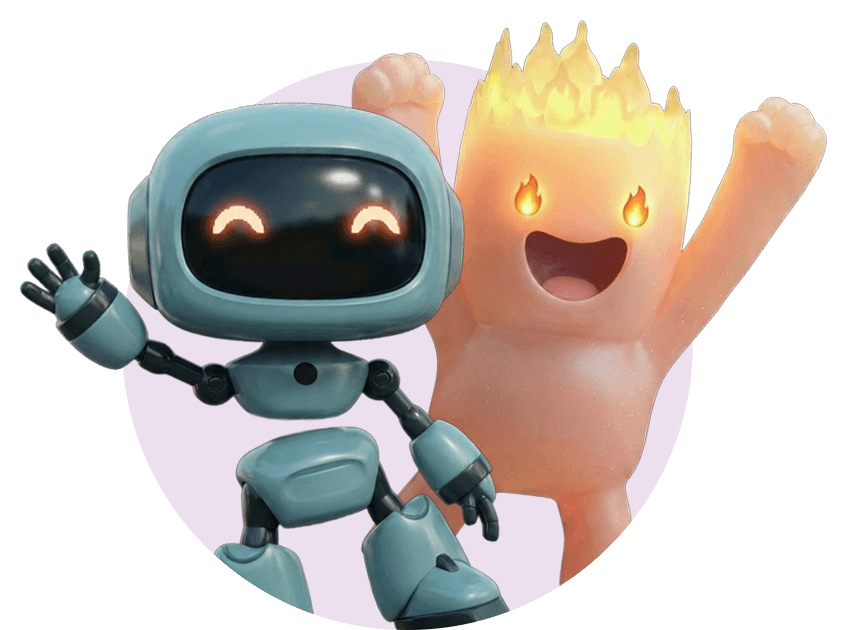
Grogo was designed with child acceptance in mind.
Challenging but never punitive
Interactions drawn from the best in “edutainment”: multiple Q&A formats; supportive, fun character interactions.
They know when the interruption is coming: They get a notification five minutes before the next Grogo break, and can start answering questions right away or wait for the break to begin.
Their dashboard lets them know how they are doing: total breaks completed, how many questions they’ve answered correctly and how many times they’ve “snacked” on Grogo outside of regular breaks.
You can briefly pause Grogo anytime you want to let them use their devices uninterrupted.
“This app can help parents support their children’s screentime without watching them all the time and arguing with them.”
Screen Time Interruption
Reset their brains with timed educational breaks from the endless scrolling
Learn more
Pausing the scroll matters!
Every parent recognizes that glazed look from endless scrolling. The science confirms what you're seeing: a 2024 study in JAMA Network Open found that reducing continuous screen time significantly improved children's behavioral problems, emotional symptoms, and peer relationships in just two weeks. Brain imaging research from Johns Hopkins shows that uninterrupted social media checking actually alters how adolescent brains develop, particularly in regions controlling attention and impulse control. The good news? You don't need to eliminate screens—just add structured breaks. Research shows even brief pauses restore attention and reduce mental fatigue, protecting developing minds while maintaining screen access.
With Grogo, your child earns their way back to their apps.
Not blocking. Not surveillance. Just natural breaks that pause the scrolling. Grogo works with how kids actually use their devices.
You control the timing: Set Grogo interruptions every 15, 30, or 45 minutes
When a break begins, Grogo locks the apps you choose: TikTok, YouTube, Instagram, Snapchat, games, etc.
When they’ve answered enough questions, Grogo lets them return to what they were doing until the next break.
Microlearning
Let concentrated bursts of learning power up their minds
Learn more
Grogo delivers the proven value of microlearning
Here's the counterintuitive truth: shorter is better for learning. A 2025 systematic review of 14 K-12 studies found microlearning significantly enhances student motivation and performance. Students using spaced repetition—breaks spread over time—showed 18% better performance than traditional instruction. Even more impressive: spacing out learning can improve retention by up to 200% compared to cramming. That's why Grogo schedules 1-2 minute breaks every 15-45 minutes—the exact window cognitive scientists recommend for lasting knowledge. Plus, mixing subjects improves learning by 25%. Short sessions, smart spacing, subject variety—all proven to boost learning and retention.
Every Grogo break delivers engaging and challenging questions from our 30,000+ question library — including Financial Literacy and Civic Life—subjects schools don’t teach and no other screen-time app offers. Plus Math, Science, History, English, and Pop Culture.
You select their grade level (2-12) for an age-appropriate starting point
Always challenging, never punitive: Grogo constantly adjusts the difficulty of the questions, up or down a grade level by subject, based on their pattern of correct and incorrect answers
You can watch their progress on your dashboard: See which subject they excel in, and which has room for most improvement. You can even watch as the grade levels of the questions they are answering rise!
Grogo even includes "Screen Smarts," tips for healthier screen time tailored to your child’s grade level
"We like that parents can track their progress on the dashboard."
Kid-Friendly Design
End the constant bickering about screen time restrictions
Learn more
Time restrictions create battles. Surveillance creates distrust. Grogo creates engagement.
Kids love Grogo—they earn access to their apps while building self-awareness about screen time. Research proves interventions that support autonomy work. Those that control? They fail. And you and your child pay the price!
Grogo was designed with child acceptance in mind.
Challenging but never punitive
Interactions drawn from the best in “edutainment”: multiple Q&A formats; supportive, fun character interactions.
They know when the interruption is coming: They get a notification five minutes before the next Grogo break, and can start answering questions right away or wait for the break to begin.
Their dashboard lets them know how they are doing: total breaks completed, how many questions they’ve answered correctly and how many times they’ve “snacked” on Grogo outside of regular breaks.
You can briefly pause Grogo anytime you want to let them use their devices uninterrupted.
“This app can help parents support their children’s screentime without watching them all the time and arguing with them.”
Screen Time Interruption
Reset their brains with timed educational breaks from the endless scrolling
Learn more
Pausing the scroll matters!
Every parent recognizes that glazed look from endless scrolling. The science confirms what you're seeing: a 2024 study in JAMA Network Open found that reducing continuous screen time significantly improved children's behavioral problems, emotional symptoms, and peer relationships in just two weeks. Brain imaging research from Johns Hopkins shows that uninterrupted social media checking actually alters how adolescent brains develop, particularly in regions controlling attention and impulse control. The good news? You don't need to eliminate screens—just add structured breaks. Research shows even brief pauses restore attention and reduce mental fatigue, protecting developing minds while maintaining screen access.
With Grogo, your child earns their way back to their apps.
Not blocking. Not surveillance. Just natural breaks that pause the scrolling. Grogo works with how kids actually use their devices.
You control the timing: Set Grogo interruptions every 15, 30, or 45 minutes
When a break begins, Grogo locks the apps you choose: TikTok, YouTube, Instagram, Snapchat, games, etc.
When they’ve answered enough questions, Grogo lets them return to what they were doing until the next break.
Microlearning
Let concentrated bursts of learning power up their minds
Learn more
Grogo delivers the proven value of microlearning
Here's the counterintuitive truth: shorter is better for learning. A 2025 systematic review of 14 K-12 studies found microlearning significantly enhances student motivation and performance. Students using spaced repetition—breaks spread over time—showed 18% better performance than traditional instruction. Even more impressive: spacing out learning can improve retention by up to 200% compared to cramming. That's why Grogo schedules 1-2 minute breaks every 15-45 minutes—the exact window cognitive scientists recommend for lasting knowledge. Plus, mixing subjects improves learning by 25%. Short sessions, smart spacing, subject variety—all proven to boost learning and retention.
Every Grogo break delivers engaging and challenging questions from our 30,000+ question library — including Financial Literacy and Civic Life—subjects schools don’t teach and no other screen-time app offers. Plus Math, Science, History, English, and Pop Culture.
You select their grade level (2-12) for an age-appropriate starting point
Always challenging, never punitive: Grogo constantly adjusts the difficulty of the questions, up or down a grade level by subject, based on their pattern of correct and incorrect answers
You can watch their progress on your dashboard: See which subject they excel in, and which has room for most improvement. You can even watch as the grade levels of the questions they are answering rise!
Grogo even includes "Screen Smarts," tips for healthier screen time tailored to your child’s grade level
"We like that parents can track their progress on the dashboard."
Kid-Friendly Design
End the constant bickering about screen time restrictions
Learn more
Time restrictions create battles. Surveillance creates distrust. Grogo creates engagement.
Kids love Grogo—they earn access to their apps while building self-awareness about screen time. Research proves interventions that support autonomy work. Those that control? They fail. And you and your child pay the price!
Grogo was designed with child acceptance in mind.
Challenging but never punitive
Interactions drawn from the best in “edutainment”: multiple Q&A formats; supportive, fun character interactions.
They know when the interruption is coming: They get a notification five minutes before the next Grogo break, and can start answering questions right away or wait for the break to begin.
Their dashboard lets them know how they are doing: total breaks completed, how many questions they’ve answered correctly and how many times they’ve “snacked” on Grogo outside of regular breaks.
You can briefly pause Grogo anytime you want to let them use their devices uninterrupted.
“This app can help parents support their children’s screentime without watching them all the time and arguing with them.”
Screen Time Interruption
Reset their brains with timed educational breaks from the endless scrolling
Learn more
Pausing the scroll matters!
Every parent recognizes that glazed look from endless scrolling. The science confirms what you're seeing: a 2024 study in JAMA Network Open found that reducing continuous screen time significantly improved children's behavioral problems, emotional symptoms, and peer relationships in just two weeks. Brain imaging research from Johns Hopkins shows that uninterrupted social media checking actually alters how adolescent brains develop, particularly in regions controlling attention and impulse control. The good news? You don't need to eliminate screens—just add structured breaks. Research shows even brief pauses restore attention and reduce mental fatigue, protecting developing minds while maintaining screen access.
With Grogo, your child earns their way back to their apps.
Not blocking. Not surveillance. Just natural breaks that pause the scrolling. Grogo works with how kids actually use their devices.
You control the timing: Set Grogo interruptions every 15, 30, or 45 minutes
When a break begins, Grogo locks the apps you choose: TikTok, YouTube, Instagram, Snapchat, games, etc.
When they’ve answered enough questions, Grogo lets them return to what they were doing until the next break.
Microlearning
Let concentrated bursts of learning power up their minds
Learn more
Grogo delivers the proven value of microlearning
Here's the counterintuitive truth: shorter is better for learning. A 2025 systematic review of 14 K-12 studies found microlearning significantly enhances student motivation and performance. Students using spaced repetition—breaks spread over time—showed 18% better performance than traditional instruction. Even more impressive: spacing out learning can improve retention by up to 200% compared to cramming. That's why Grogo schedules 1-2 minute breaks every 15-45 minutes—the exact window cognitive scientists recommend for lasting knowledge. Plus, mixing subjects improves learning by 25%. Short sessions, smart spacing, subject variety—all proven to boost learning and retention.
Every Grogo break delivers engaging and challenging questions from our 30,000+ question library — including Financial Literacy and Civic Life—subjects schools don’t teach and no other screen-time app offers. Plus Math, Science, History, English, and Pop Culture.
You select their grade level (2-12) for an age-appropriate starting point
Always challenging, never punitive: Grogo constantly adjusts the difficulty of the questions, up or down a grade level by subject, based on their pattern of correct and incorrect answers
You can watch their progress on your dashboard: See which subject they excel in, and which has room for most improvement. You can even watch as the grade levels of the questions they are answering rise!
Grogo even includes "Screen Smarts," tips for healthier screen time tailored to your child’s grade level
"We like that parents can track their progress on the dashboard."
Kid-Friendly Design
End the constant bickering about screen time restrictions
Learn more
Time restrictions create battles. Surveillance creates distrust. Grogo creates engagement.
Kids love Grogo—they earn access to their apps while building self-awareness about screen time. Research proves interventions that support autonomy work. Those that control? They fail. And you and your child pay the price!
Grogo was designed with child acceptance in mind.
Challenging but never punitive
Interactions drawn from the best in “edutainment”: multiple Q&A formats; supportive, fun character interactions.
They know when the interruption is coming: They get a notification five minutes before the next Grogo break, and can start answering questions right away or wait for the break to begin.
Their dashboard lets them know how they are doing: total breaks completed, how many questions they’ve answered correctly and how many times they’ve “snacked” on Grogo outside of regular breaks.
You can briefly pause Grogo anytime you want to let them use their devices uninterrupted.
“This app can help parents support their children’s screentime without watching them all the time and arguing with them.”


How Grogo Works
Grogo works by interrupting the mindless scrolling with brain-boosting educational screen breaks.
How Grogo Works
Grogo works by interrupting the mindless scrolling with brain-boosting educational screen breaks.
How Grogo Works
Grogo works by interrupting the mindless scrolling with brain-boosting educational screen breaks.

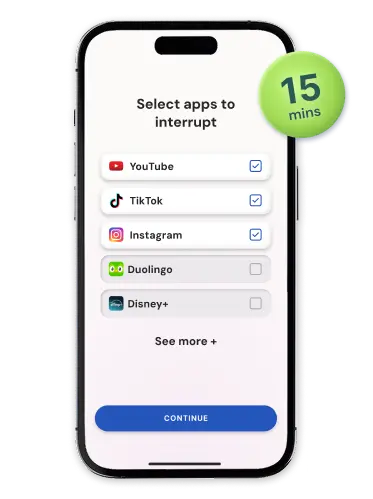
Select interruption interval and apps to lock
You have full control over how often breaks occur and what apps get blocked.
1
Select interruption interval and apps to lock
You have full control over how often breaks occur and what apps get blocked.
1
Select interruption interval and apps to lock
You have full control over how often breaks occur and what apps get blocked.
1
Select interruption interval and apps to lock
You have full control over how often breaks occur and what apps get blocked.
1
Select interruption interval and apps to lock
You have full control over how often breaks occur and what apps get blocked.
1
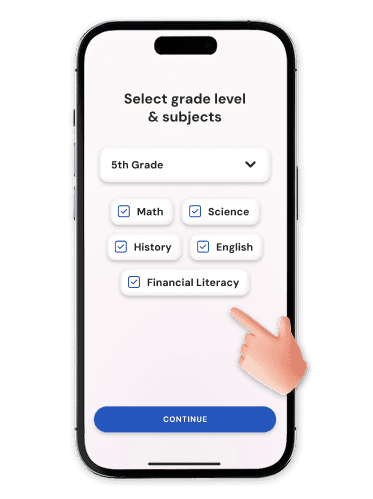
Set grade level and subject categories
Grogo questions are powered by AI to tailor questions for your child’s learning level and what subjects you want them to focus on.
2
Set grade level and subject categories
Grogo questions are powered by AI to tailor questions for your child’s learning level and what subjects you want them to focus on.
2
Set grade level and subject categories
Grogo questions are powered by AI to tailor questions for your child’s learning level and what subjects you want them to focus on.
2
Set grade level and subject categories
Grogo questions are powered by AI to tailor questions for your child’s learning level and what subjects you want them to focus on.
2
Set grade level and subject categories
Grogo questions are powered by AI to tailor questions for your child’s learning level and what subjects you want them to focus on.
2

Kids answer engaging and challenging questions
Grogo automatically triggers breaks for learning, interrupting mindless screen time with constructive content.
3
Kids answer engaging and challenging questions
Grogo automatically triggers breaks for learning, interrupting mindless screen time with constructive content.
3
Kids answer engaging and challenging questions
Grogo automatically triggers breaks for learning, interrupting mindless screen time with constructive content.
3
Kids answer engaging and challenging questions
Grogo automatically triggers breaks for learning, interrupting mindless screen time with constructive content.
3
Kids answer engaging and challenging questions
Grogo automatically triggers breaks for learning, interrupting mindless screen time with constructive content.
3

Want to check your child’s progress on your own device?
Want to check your child’s progress on your own device?
Download the app on Apple App Store or Google Play Store to get your dashboard and manage subjects and break intervals. But it’s not required— EVERYTHING works from your child’s device. That’s it, you’re ready to Gro-GO!
Download the app on Apple App Store or Google Play Store to get your dashboard and manage subjects and break intervals. But it’s not required— EVERYTHING works from your child’s device. That’s it, you’re ready to Gro-GO!



Parents, Kids, and Experts LOVE Grogo
In talking with over 2,700 parents, we found most want a better screen-time solution—and nearly all say Grogo is it. Kids love game-like challenges, and parents love that it ends the “screen-time police” struggle. Grogo turns screen time into growth time, giving kids self-esteem and parents peace of mind.
Parents, Kids, and Experts LOVE Grogo
In talking with over 2,700 parents, we found most want a better screen-time solution—and nearly all say Grogo is it. Kids love game-like challenges, and parents love that it ends the “screen-time police” struggle. Grogo turns screen time into growth time, giving kids self-esteem and parents peace of mind.
Parents, Kids, and Experts LOVE Grogo
In talking with over 2,700 parents, we found most want a better screen-time solution—and nearly all say Grogo is it. Kids love game-like challenges, and parents love that it ends the “screen-time police” struggle. Grogo turns screen time into growth time, giving kids self-esteem and parents peace of mind.
"Are you tired of watching your child scroll all day long on their smartphone? Try Grogo, a brand new parenting app that allows you to interrupt whatever your child's doing at any interval you want to set by asking a series of educationally appropriate questions. This not only helps your child get some extra learning in, but it improves their self-esteem, and it allows them to develop better screen habits”
T
Tom Kersting
Psychotherapist and author of “Raising Healthy Teenagers” and “Disconnected”
"Are you tired of watching your child scroll all day long on their smartphone? Try Grogo, a brand new parenting app that allows you to interrupt whatever your child's doing at any interval you want to set by asking a series of educationally appropriate questions. This not only helps your child get some extra learning in, but it improves their self-esteem, and it allows them to develop better screen habits”
T
Tom Kersting
Psychotherapist and author of “Raising Healthy Teenagers” and “Disconnected”
"Are you tired of watching your child scroll all day long on their smartphone? Try Grogo, a brand new parenting app that allows you to interrupt whatever your child's doing at any interval you want to set by asking a series of educationally appropriate questions. This not only helps your child get some extra learning in, but it improves their self-esteem, and it allows them to develop better screen habits”
T
Tom Kersting
Psychotherapist and author of “Raising Healthy Teenagers” and “Disconnected”
“This app just changed my whole life. I love everything!”
B
Henry
3rd grade boy
“This app just changed my whole life. I love everything!”
B
Henry
3rd grade boy
“I like that every 15 minutes they’re going to have to answer questions to make their brain work. Their brain – it’s not a vegetable – it’s actually having to exercise.”
J
Joe
father of rising 7th grader son and rising 10th grade daughter
“I like that every 15 minutes they’re going to have to answer questions to make their brain work. Their brain – it’s not a vegetable – it’s actually having to exercise.”
J
Joe
father of rising 7th grader son and rising 10th grade daughter
“It's non-punitive, engaging and designed to build both knowledge and confidence. Grogo doesn't just curb screen time. It helps kids form better digital habits.”
B
Beth Anderson
Educator and CEO of Core Learning Foundation
“It's non-punitive, engaging and designed to build both knowledge and confidence. Grogo doesn't just curb screen time. It helps kids form better digital habits.”
B
Beth Anderson
Educator and CEO of Core Learning Foundation
“It's non-punitive, engaging and designed to build both knowledge and confidence. Grogo doesn't just curb screen time. It helps kids form better digital habits.”
B
Beth Anderson
Educator and CEO of Core Learning Foundation
See all reviews
See all reviews
See all reviews
See all reviews

Try Grogo Free for 7 days
Curious to see how Grogo fits into your family’s routine? Start with a 7-day free, full-access trial— no credit card required! When it’s time to subscribe? We’re inviting early subscribers to lock in a special charter rate for the new, even better Grogo – and keep it for as long as you stay with Grogo! You see what we’re building – help us grow it and we’ll make sure it’s worth your while. For pennies a day, you can watch as Grogo transforms your child’s relationship with their devices, one “Pause the Scroll. Power up the Mind” break at a time.
Try Grogo Free for 7 days
Curious to see how Grogo fits into your family’s routine? Start with a 7-day free, full-access trial— no credit card required! When it’s time to subscribe? We’re inviting early subscribers to lock in a special charter rate for the new, even better Grogo – and keep it for as long as you stay with Grogo! You see what we’re building – help us grow it and we’ll make sure it’s worth your while. For pennies a day, you can watch as Grogo transforms your child’s relationship with their devices, one “Pause the Scroll. Power up the Mind” break at a time.
Try Grogo Free for 7 days
Curious to see how Grogo fits into your family’s routine? Start with a 7-day free, full-access trial— no credit card required! When it’s time to subscribe? We’re inviting early subscribers to lock in a special charter rate for the new, even better Grogo – and keep it for as long as you stay with Grogo! You see what we’re building – help us grow it and we’ll make sure it’s worth your while. For pennies a day, you can watch as Grogo transforms your child’s relationship with their devices, one “Pause the Scroll. Power up the Mind” break at a time.
Monthly
Yearly
Get two months free with an annual subscription!
One Child
For families with only one child.
$5.99
regular price
$1.99
/month
$59.99
regular price
$19.99
/year


1 child profile mobile

Unlimited active devices

Full library of 30,000+ questions

Parent dashboard & child dashboards

Progress tracking

Two months free versus monthly plan
Family
For families with more than one child.
$7.99
regular price
$2.99
/month
$79.99
regular price
$29.99
/year

Unlimited child profiles
Unlimited active devices
Full library of 30,000+ questions
Parent dashboard & child dashboards
Individual progress tracking
Two months free versus monthly plan
Monthly
Yearly
Get two months free with an annual subscription!
One Child
For families with only one child.
$5.99
regular price
$1.99
/month
$59.99
regular price
$19.99
/year
1 child profile mobile
Unlimited active devices
Full library of 30,000+ questions
Parent dashboard & child dashboards
Progress tracking
Two months free versus monthly plan
Family
For families with more than one child.
$7.99
regular price
$2.99
/month
$79.99
regular price
$29.99
/year
Unlimited child profiles
Unlimited active devices
Full library of 30,000+ questions
Parent dashboard & child dashboards
Individual progress tracking
Two months free versus monthly plan
Monthly
Yearly
Get two months free with an annual subscription!
One Child
For families with only one child.
$5.99
regular price
$1.99
/month
$59.99
regular price
$19.99
/year
1 child profile mobile
Unlimited active devices
Full library of 30,000+ questions
Parent dashboard & child dashboards
Progress tracking
Two months free versus monthly plan
Family
For families with more than one child.
$7.99
regular price
$2.99
/month
$79.99
regular price
$29.99
/year
Unlimited child profiles
Unlimited active devices
Full library of 30,000+ questions
Parent dashboard & child dashboards
Individual progress tracking
Two months free versus monthly plan
Monthly
Yearly
Get two months free with an annual subscription!
One Child
For families with only one child.
$5.99
regular price
$1.99
/month
$59.99
regular price
$19.99
/year
1 child profile mobile
Unlimited active devices
Full library of 30,000+ questions
Parent dashboard & child dashboards
Progress tracking
Two months free versus monthly plan
Family
For families with more than one child.
$7.99
regular price
$2.99
/month
$79.99
regular price
$29.99
/year
Unlimited child profiles
Unlimited active devices
Full library of 30,000+ questions
Parent dashboard & child dashboards
Individual progress tracking
Two months free versus monthly plan
No credit card required for trial.
Special charter member pricing, act now to lock in this rate!
No credit card required for trial.
Special charter member pricing, act now to lock in this rate!
No credit card required for trial.
Special charter member pricing, act now to lock in this rate!
No credit card required for trial.
Special charter member pricing, act now to lock in this rate!


FAQs
FAQs
FAQs

What devices does Grogo work on?
Grogo works on iPhone and iPad (iOS 16 and above) and Android phones (Android 10 and above). Note that Android tablets are not currently supported. Install Grogo directly on your child’s device — that’s all you need to get started. If you want to access the parent dashboard on your own phone, you can add it later, but it’s completely optional – you can see that by accessing your account on your child’s device.
What age is Grogo designed for?
Grogo is built for kids in grades 2 through 12 — roughly ages 6 to 18. You select your child’s grade level at setup, and Grogo automatically serves age-appropriate questions across Financial Literacy and Civic Life –subjects school don’t even teach - plus Math, Science, History, English, and Pop Culture. As they improve, the questions get harder. As they struggle, Grogo eases up. It adjusts constantly, so there’s always a right-sized challenge.
Is setup really that easy?
Yes! Download Grogo on your child’s device, set their grade level and the subjects you want them to focus on, choose how often you want Grogo to interrupt the scrolling, and select the apps you want paused. That’s it — most parents are up and running in just a few minutes. Adding Grogo to your own phone for the parent dashboard is optional; everything works perfectly from your child’s device alone.
Does it work with all apps?
You choose which apps Grogo interrupts — social media, games, browsers, streaming, whatever you want. Apps like phone, messages, and emergency services are never interrupted. Ever.
How is Grogo different from Bark, Circle, or Qustodio?
Those are solid tools for monitoring and restricting — but monitoring and restricting create conflict. Grogo does something none of them do: it makes screen time BETTER. Instead of watching what your kid does or cutting off access, Grogo steps in with a short educational break, lets your child earn their way back to their apps, and builds real knowledge and self-esteem along the way. Less surveillance. Less conflict. More growth. And if you’re already using Apple Screen Time, Google Family Link, or a similar app, Grogo is designed to work right alongside them — or replace them entirely. You decide.
What if the questions are too hard or too easy?
Grogo adapts. Our algorithm constantly adjusts difficulty up or down by grade level and subject based on your child’s pattern of correct and incorrect answers — so they’re always challenged, never frustrated, and never bored. Our 30,000+ question library is AI-generated and triple-verified for correctness and safety across multiple AI platforms. You can track their progress on your parent dashboard and watch as the grade level of the questions they’re answering rises over time.
Can I pause Grogo during homework or other activities?
Yes. Grogo has a pause button for exactly those moments — homework, dinner, family time, or whenever you want to give your kids a break from Grogo breaks. Just don’t forget to unpause it when you’re ready for Grogo to resume. You can also choose which apps get interrupted in the first place, so educational apps your child uses for school can always be left out of the mix.
Will my child just delete the app?
Kids are good at finding workarounds — but Grogo was designed with child engagement in mind, not just parental control. If they aren’t using Grogo the way you expect, you’ll get an email notification so you can see what’s up. Check to make sure you didn’t pause Grogo. And make sure that you don’t share your PIN, which gives access to Grogo’s settings (and if you already did share it, considering creating a new one).
Is my child’s data private?
Yes. Grogo collects no personally identifiable child information. We only collect what’s needed for the app to work and for you to track progress by username. We never share or sell your data to anyone.
How does the free trial work — and how do I cancel?
Start with a full 7-day free trial — no credit card required. When your trial ends, you’ll be prompted to choose a plan. If you don’t subscribe, Grogo simply stops running. No surprise charges. If you do subscribe and later want to cancel, it’s easy and penalty- free: cancel anytime directly through the App Store or Google Play, and your subscription stays active through the end of the period you’ve already paid for.
What devices does Grogo work on?
Grogo works on iPhone and iPad (iOS 16 and above) and Android phones (Android 10 and above). Note that Android tablets are not currently supported. Install Grogo directly on your child’s device — that’s all you need to get started. If you want to access the parent dashboard on your own phone, you can add it later, but it’s completely optional – you can see that by accessing your account on your child’s device.
What age is Grogo designed for?
Grogo is built for kids in grades 2 through 12 — roughly ages 6 to 18. You select your child’s grade level at setup, and Grogo automatically serves age-appropriate questions across Financial Literacy and Civic Life –subjects school don’t even teach - plus Math, Science, History, English, and Pop Culture. As they improve, the questions get harder. As they struggle, Grogo eases up. It adjusts constantly, so there’s always a right-sized challenge.
Is setup really that easy?
Yes! Download Grogo on your child’s device, set their grade level and the subjects you want them to focus on, choose how often you want Grogo to interrupt the scrolling, and select the apps you want paused. That’s it — most parents are up and running in just a few minutes. Adding Grogo to your own phone for the parent dashboard is optional; everything works perfectly from your child’s device alone.
Does it work with all apps?
You choose which apps Grogo interrupts — social media, games, browsers, streaming, whatever you want. Apps like phone, messages, and emergency services are never interrupted. Ever.
How is Grogo different from Bark, Circle, or Qustodio?
Those are solid tools for monitoring and restricting — but monitoring and restricting create conflict. Grogo does something none of them do: it makes screen time BETTER. Instead of watching what your kid does or cutting off access, Grogo steps in with a short educational break, lets your child earn their way back to their apps, and builds real knowledge and self-esteem along the way. Less surveillance. Less conflict. More growth. And if you’re already using Apple Screen Time, Google Family Link, or a similar app, Grogo is designed to work right alongside them — or replace them entirely. You decide.
What if the questions are too hard or too easy?
Grogo adapts. Our algorithm constantly adjusts difficulty up or down by grade level and subject based on your child’s pattern of correct and incorrect answers — so they’re always challenged, never frustrated, and never bored. Our 30,000+ question library is AI-generated and triple-verified for correctness and safety across multiple AI platforms. You can track their progress on your parent dashboard and watch as the grade level of the questions they’re answering rises over time.
Can I pause Grogo during homework or other activities?
Yes. Grogo has a pause button for exactly those moments — homework, dinner, family time, or whenever you want to give your kids a break from Grogo breaks. Just don’t forget to unpause it when you’re ready for Grogo to resume. You can also choose which apps get interrupted in the first place, so educational apps your child uses for school can always be left out of the mix.
Will my child just delete the app?
Kids are good at finding workarounds — but Grogo was designed with child engagement in mind, not just parental control. If they aren’t using Grogo the way you expect, you’ll get an email notification so you can see what’s up. Check to make sure you didn’t pause Grogo. And make sure that you don’t share your PIN, which gives access to Grogo’s settings (and if you already did share it, considering creating a new one).
Is my child’s data private?
Yes. Grogo collects no personally identifiable child information. We only collect what’s needed for the app to work and for you to track progress by username. We never share or sell your data to anyone.
How does the free trial work — and how do I cancel?
Start with a full 7-day free trial — no credit card required. When your trial ends, you’ll be prompted to choose a plan. If you don’t subscribe, Grogo simply stops running. No surprise charges. If you do subscribe and later want to cancel, it’s easy and penalty- free: cancel anytime directly through the App Store or Google Play, and your subscription stays active through the end of the period you’ve already paid for.
What devices does Grogo work on?
Grogo works on iPhone and iPad (iOS 16 and above) and Android phones (Android 10 and above). Note that Android tablets are not currently supported. Install Grogo directly on your child’s device — that’s all you need to get started. If you want to access the parent dashboard on your own phone, you can add it later, but it’s completely optional – you can see that by accessing your account on your child’s device.
What age is Grogo designed for?
Grogo is built for kids in grades 2 through 12 — roughly ages 6 to 18. You select your child’s grade level at setup, and Grogo automatically serves age-appropriate questions across Financial Literacy and Civic Life –subjects school don’t even teach - plus Math, Science, History, English, and Pop Culture. As they improve, the questions get harder. As they struggle, Grogo eases up. It adjusts constantly, so there’s always a right-sized challenge.
Is setup really that easy?
Yes! Download Grogo on your child’s device, set their grade level and the subjects you want them to focus on, choose how often you want Grogo to interrupt the scrolling, and select the apps you want paused. That’s it — most parents are up and running in just a few minutes. Adding Grogo to your own phone for the parent dashboard is optional; everything works perfectly from your child’s device alone.
Does it work with all apps?
You choose which apps Grogo interrupts — social media, games, browsers, streaming, whatever you want. Apps like phone, messages, and emergency services are never interrupted. Ever.
How is Grogo different from Bark, Circle, or Qustodio?
Those are solid tools for monitoring and restricting — but monitoring and restricting create conflict. Grogo does something none of them do: it makes screen time BETTER. Instead of watching what your kid does or cutting off access, Grogo steps in with a short educational break, lets your child earn their way back to their apps, and builds real knowledge and self-esteem along the way. Less surveillance. Less conflict. More growth. And if you’re already using Apple Screen Time, Google Family Link, or a similar app, Grogo is designed to work right alongside them — or replace them entirely. You decide.
What if the questions are too hard or too easy?
Grogo adapts. Our algorithm constantly adjusts difficulty up or down by grade level and subject based on your child’s pattern of correct and incorrect answers — so they’re always challenged, never frustrated, and never bored. Our 30,000+ question library is AI-generated and triple-verified for correctness and safety across multiple AI platforms. You can track their progress on your parent dashboard and watch as the grade level of the questions they’re answering rises over time.
Can I pause Grogo during homework or other activities?
Yes. Grogo has a pause button for exactly those moments — homework, dinner, family time, or whenever you want to give your kids a break from Grogo breaks. Just don’t forget to unpause it when you’re ready for Grogo to resume. You can also choose which apps get interrupted in the first place, so educational apps your child uses for school can always be left out of the mix.
Will my child just delete the app?
Kids are good at finding workarounds — but Grogo was designed with child engagement in mind, not just parental control. If they aren’t using Grogo the way you expect, you’ll get an email notification so you can see what’s up. Check to make sure you didn’t pause Grogo. And make sure that you don’t share your PIN, which gives access to Grogo’s settings (and if you already did share it, considering creating a new one).
Is my child’s data private?
Yes. Grogo collects no personally identifiable child information. We only collect what’s needed for the app to work and for you to track progress by username. We never share or sell your data to anyone.
How does the free trial work — and how do I cancel?
Start with a full 7-day free trial — no credit card required. When your trial ends, you’ll be prompted to choose a plan. If you don’t subscribe, Grogo simply stops running. No surprise charges. If you do subscribe and later want to cancel, it’s easy and penalty- free: cancel anytime directly through the App Store or Google Play, and your subscription stays active through the end of the period you’ve already paid for.
What Sets Grogo Apart
What Sets Grogo Apart
What Sets Grogo Apart
The Breakthrough
The Breakthrough
Grogo is the only app that combines parental device management WITH education WHILE preserving child autonomy. We're making the time kids spend online BETTER.
Grogo is the only app that combines parental device management WITH education WHILE preserving child autonomy. We're making the time kids spend online BETTER.
Feature
Feature
Feature
Feature
Traditional Parental
Control Apps
Traditional Parental
Control Apps
Traditional Parental
Control Apps
Parental
Control Apps
Educational Apps (like Duolingo, Khan Academy)
Educational Apps (like Duolingo, Khan Academy)
Educational Apps (like Duolingo, Khan Academy)
Educational Apps
Purpose
Purpose
Purpose
Purpose
Healthier Screen Time
Healthier Screen Time
Healthier Screen Time
Healthier Screen Time
Monitor/Block/Restrict Access
Monitor/Block/Restrict Access
Monitor/Block/Restrict Access
Monitor/Block/Restrict Access
Dedicated learning
Dedicated learning
Dedicated learning
Dedicated learning
Interrupts scrolling
Interrupts scrolling
Interrupts scrolling
Interrupts scrolling
Microlearning benefits
Microlearning benefits
Microlearning benefits
Microlearning benefits
Teaches Financial Literacy & Civics
Teaches Financial Literacy & Civics
Teaches Financial Literacy & Civics
Teaches Financial Literacy & Civics
Positive child reaction
Positive child reaction
Positive child reaction
Positive child reaction
Supports child autonomy
Supports child autonomy
Supports child autonomy
Supports child autonomy
Low parent-child conflict
Low parent-child conflict
Low parent-child conflict
Low parent-child conflict
Research-backed approach
Research-backed approach
Research-backed approach
Research-backed approach

About Grogo
About Grogo
About Grogo
Our Mission
Our Mission
Healthier Screen Time
Healthier Screen Time

Our Values
Our Values
Playful, yet challenging
Learning should be fun, and we make it that way
Playful, yet challenging
Learning should be fun, and we make it that way
Supportive and trustworthy
Grogo is a partner parents can count on
Supportive and trustworthy
Grogo is a partner parents can count on
Engaging and educational
Every Grogo break combines fun with knowledge, keeping kids motivated
Engaging and educational
Every Grogo break combines fun with knowledge, keeping kids motivated
Our Story
Our Story
Grogo was founded by parents who’ve seen firsthand how technology affects children’s lives, both for better and for worse. Our NAPPA Award-winning app was built for families with kids from elementary school through high school (grades 2–12). We created the Grogo app because we believe that screen time doesn’t have to be all or nothing—we can give kids the tools to develop balanced digital habits, build self-esteem, and make learning part of their daily routine.
Grogo was founded by parents who’ve seen firsthand how technology affects children’s lives, both for better and for worse. Our NAPPA Award-winning app was built for families with kids from elementary school through high school (grades 2–12). We created the Grogo app because we believe that screen time doesn’t have to be all or nothing—we can give kids the tools to develop balanced digital habits, build self-esteem, and make learning part of their daily routine.